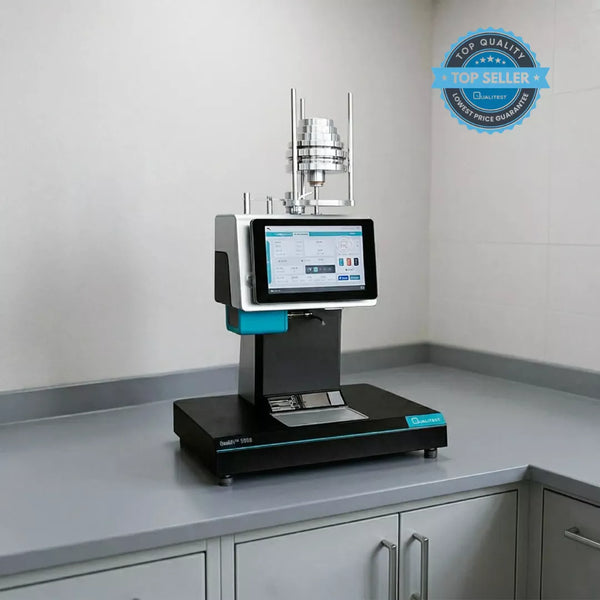
Two of the big-deal numbers used to check how melted plastic behaves are Melt Flow Rate (MFR) and Melt Volume Rate (MVR). While they are measuring things that feel pretty similar, they aren't identical twins.
In this tell-all guide, we are going to break down the differences in MFR vs MVR, talk about why both of them matter for your bottom line, and show you the easy way to jump between these two numbers in your daily lab work.
Key Takeaways
- MFR tracks weight while MVR tracks volume: Melt Flow Rate measures the actual grams of plastic pushed out, but Melt Volume Rate measures the physical space that melted plastic takes up.
- Melt density connects the two metrics: You can easily swap between these two numbers with a quick math formula, as long as you know exactly how much your plastic expands under heat.
- MVR is the clear winner for automated labs: Relying on volume allows digital sensors to do the math for you, completely cutting out the manual snipping and human mistakes associated with traditional MFR tests.
- Bad prep ruins perfect data: Even a tiny temperature slip or a slightly damp sample will completely wreck your flow numbers and send good parts straight to the scrap bin.
What’s the Deal with Melt Flow Rate (MFR)?
Melt Flow Rate (MFR), or Melt Flow Index if you are using the older terminology, is all about weighing the actual physical sample of plastic that flows through a small die over ten minutes while being squeezed by a heavy weight.
We talk about MFR in grams per 10 minutes (g/10 min). It is a super handy way to figure out the size of the tiny chains making up your plastic.
From where we sit, MFR is still the "tried and true" choice for basic materials. A higher MFR means the stuff is runny and easy to move, while a lower MFR means you are dealing with something thick, sticky, and stubborn.
For instance, the heavy-duty plastic used to build a thick underground water pipe has a completely different, much lower flow number than the ultra-runny plastic used to mold a thin-walled, disposable water bottle.
What About Melt Volume Rate (MVR)?
Melt Volume Rate (MVR), on the flip side, is more about the space the melted plastic takes up as it gets pushed through that same die.
MVR is written down as cubic centimeters per 10 minutes (cm³/10 min). To get this number, the machine has to keep a sharp eye on how far the piston moves down the heated tube.
We think this way of doing things is a total lifesaver when you are working with plastics that have bits of filler or special blends. Think about manufacturing a car dashboard panel using a plastic packed with glass fibers for extra strength; the weight of those glass fibers can make the material act unpredictably, making a volume check a much better measurement than a simple weight check.
The Big Showdown: MFR vs MVR (Method A vs. Method B)
When you look at mfr vs mvr, the big split is simply whether you are counting the weight or the volume. Both are heavily used as quality-control indices and for comparing material grades, but your choice changes how you actually spend your time in the lab.
- MFR relies on Procedure A: This is the manual way where you have to physically snip the plastic at just the right time and then go weigh it on a high-precision scale. If your shop sticks strictly to these traditional weight checks, a dependable baseline unit like our MFI Melt Flow Indexer QualiFi-2000 Series is exactly what you need to keep things running smoothly.
- MVR relies on Procedure B: This is the automated way where a digital sensor tracks the piston's travel, figuring out the volume automatically so you do not have to stand there with a pair of scissors.
Related article: Melt Flow Index vs Molecular Weight: A Technical Guide
Why MVR is the Way to Go for Automated Testing
For basic, standard plastics where you already know the density by heart, MFR usually gets the job done. But if you compare mvr vs mfr to make your lab run like a well-oiled machine, we think MVR is the clear winner. This shift to hands-free testing is exactly why we built the QualiFi™ 6000G-Auto Melt Flow Indexer.
By letting the machine do the heavy lifting and math for you, you cut out those tiny human mistakes that can mess up your data. We see this move to MVR-style automation as a total win for anyone who wants their numbers to be spot on every single time.
Related article: Compare Manual vs Automatic Melt Flow Index Testers
The Math: How to Calculate the Difference from MVR and MFR
If you are freshening up your lab rules or looking at a new supplier’s spec sheet, you are probably wondering how to calculate the difference from mvr and mfr so your old data and new data stay in sync.
The gap between these two numbers comes down to one physical trait of the material when it is hot: Melt Density (ρmelt).
Since plastic grows and takes up more space when it gets hot, its density when melted is a bit lower than when it is sitting cold on your desk. We think that getting a grip on this thermal expansion is the key to being a pro at reading your data. To bridge that gap between the volume (MVR) and the weight (MFR), you just need to know the melt density of your specific plastic at the exact test temperature and load.
Because they use different units, calculating the actual difference means you have to convert one into the other first. You take your measured MFR and subtract your calculated MFR.
If you end up with a significant non-zero difference (ΔMFR = MFRmeasured - (MVR × ρmelt)), it is a red flag pointing to a measurement error, a bad density assumption, or mismatched test conditions.
Picture a common shop floor situation where a major automotive parts supplier suddenly changes their material spec sheet format from a volume measurement to a weight measurement. Instead of shutting down the line and sending everything back to the lab for re-testing, a sharp QA team can run this exact conversion on the fly to save an entire afternoon of production.
How to Convert MVR to MFR
The good news is you do not have to toss your old MVR records in the bin if a customer suddenly asks for MFR numbers. It is dead simple to convert mvr to mfr with a quick bit of math, as long as you have that melt density number handy. Keep in mind that the relationship changes with density, so you absolutely cannot use one fixed conversion number across different polymers.
Here is the basic formula:
And if you need to go the other way to find MVR:
Example: Say you have an MVR of 10 for some polypropylene. If the melt density at that heat is 0.75 g/cm³, the math looks like this:
MFR = 10 × 0.75
MFR = 7.5 g/10 min
By using this trick, we are confident your quality team can swap between different standards without a struggle, keeping your production perfectly on track.
Common MFR/MVR Ranges for Making Stuff
Knowing your flow rate isn’t just a "nice to have" for the lab; it tells you exactly how the plastic is going to act when it hits your molds or extruders. We see it all the time. Picking the wrong MFR range is one of the fastest ways to end up with a pile of scrap and a stopped machine.
| Method of Production | Usual MFR Range (g/10 min) | What the Material is Like | Everyday Real-World Example |
|---|---|---|---|
| Extrusion (Pipes, Siding) | < 2 | Tough and thick so it holds its shape while cooling. | PVC plumbing pipes, vinyl house siding |
| Blow Molding (Bottles) | 1 – 4 | Just enough strength so it doesn't sag when you blow air in. | Milk jugs, shampoo bottles |
| Film Production | 1 – 5 | A solid middle ground between strength and easy flow. | Grocery bags, food packaging wrap |
| Injection Molding | 5 – 50+ | Super runny so it can zip into every corner of a complex mold. | Car bumpers, plastic cutlery, Lego bricks |
Things That Can Mess Up Your MFR and MVR Numbers
Even if you are a pro at these metrics, you can still get weird results if you aren't careful. In our opinion, forgetting these three things is usually where things go sideways:
- Moisture Hiding Inside: Some plastics like PET or Nylon love to soak up water. Consider what happens when a batch of wet Nylon hits a hot test tube. The water turns to steam, the plastic breaks down, and the resulting flow numbers are artificially sky-high. If those bad numbers are trusted, a whole batch of brittle, useless parts could end up in the scrap bin. We think drying is a "do it or don't bother testing" step.
- Temperature Slips: Flow is super sensitive to heat. We are convinced that even a tiny half-degree slip in your machine’s temperature is enough to make your MFR and MVR numbers totally useless. That is exactly why gear like our QualiFi™ 5000 Galaxy Series MFI locks down the barrel heat with absolute precision, so you never have to second-guess the screen.
- Staying Too Long: If the sample sits in the hot tube for too long before the test starts, the plastic starts to cook and degrade. This makes the material look runnier than it actually is.
Better Polymer Testing with Qualitest
Getting your polymer flow numbers right shouldn't be a guessing game.
At Qualitest, we provide North American shops with high-accuracy, cost-effective Melt Flow Indexers—from the straightforward QualiFi-2000 to the fully automated 6000G-Auto—that take the stress out of your quality checks. Whether you rely on MFR or MVR, our gear is built to keep your production consistent and your bottom line profitable.
Explore our full lineup of cost-effective Melt Flow Testers and Indexers to find the right fit for your shop. We are here to help you keep things consistent, high-quality, and ultimately profitable.
References:
Biçen, A., & Çağlı, Ç. (2025). Computerized Automation and Machine Learning for Prediction of Melt Mass-Flow Rate Using Custom-Built Machine in Industrial IoT. IEEE Transactions on Industrial Informatics, 21, 9468-9479.